For artists who have problems with perspective (furniture etc.) in indoor scenes like me – there’s an online programm called roomsketcher where you can design a house/roon and snap pictures of it using different perspectives.
It’s got an almost endless range of furniture, doors, windows, stairs etc and is easy to use. In addition to that, you don’t have to install anything and if you create an account (which is free) you can save and return to your houses.
So like, when it comes to wow. it honestly feels like my art is “alright”. I love wow, I love the styleand while it might seem slightly excessive to do a YEAR LONG CHALLENGE. I really believe at the end of the year I (and we) are going to be fucking awesome painters capable of making any beautiful wow art.
There’s also so many skills that we’re gonna learn from this.
IF YOU WANNA DO THIS WITH ME, TAG ALL YOUR RELATED POSTS WITH #WOLFUUPACK SO I CAN FIND YOU.
Even better – follow me, reblog this saying you’re gonna do it and i’ll follow you. Let’s be blizzard standard together guys ❤ If you want to be an excellent artist – why not start tomorrow?
The program is called Sculptris and is a free off-shoot program from Zbrush, that program that you keep hearing about but either takes selling your kidneys or piracy to actually use.
If you download it and sculpt out a facial model, you can have references for your own work for all of time. No more endlessly searching Google for reference materials or twisting/rotating/flipping a drawing to see if there are flaws. And you can easily edit it to create more facial types. This way, you can make character references for any and every face and facial angle that you can think of.
The program offers mirroring right from the start, so your faces will be perfectly symmetrical. You can turn off the symmetry for things like scars or otherwise.
It takes a little time. For instance, I downloaded the program on Christmas and, in my spare time, this took a few days of getting familiar with the program (first day) and then sculpting for a few minutes each day, mostly due to my perfectionist nature. And this one isn’t even done. I still have to mold the mouth, ears, and other smaller aspects before I consider it done. However, I was so giddy over the possibilities that I wanted to share this with my fellow artists.
From now on, I have reference for a face in my own style and will be able to create things so much easier in the future.
I hope that this helps you guys and that you have fun with it.
I absolutely recommend Sculptris!
UH
GUYS????
This really useful oh my goodness. It takes a little figuring out, but once you get the hang of it it’s actually pretty easy. Just watch a couple youtube videos. Seeing how other people do it helps you to make sense of it.
OH BOY LOOK AT THIS HANDSOME SILLY do you know how hard his stupid face is to figure out at different angles? DO YOU??? Now I have a 3D ref!!! AAAHH!! so excite much 3d wow very angles wow
I’ve said this before and I’ll say it again: sculptris is an amazing 3D modeling tool for how small it is and is a great place to start whether you just want drawing references for your characters or you actually want to get into 3D modeling.
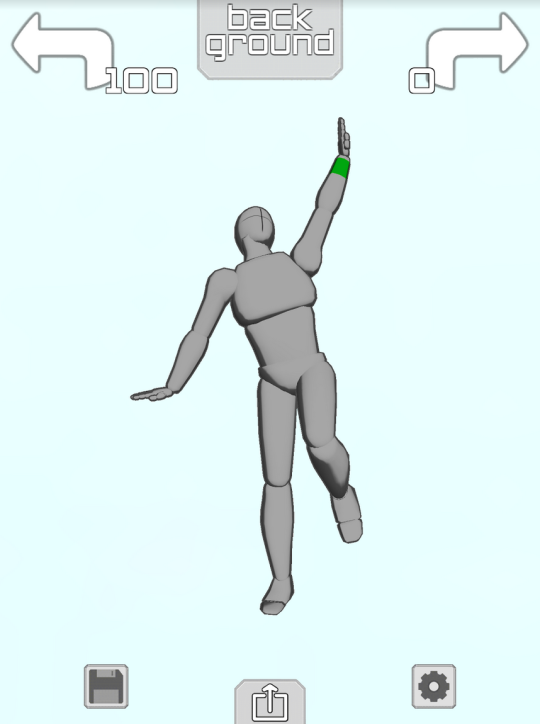
if you have an ipod or iphone or ipad or whatever then Please download the app “Make a Pose”
it gives you a lil figure like this
and you can make them do whatever you want!! Like
Took me about 1.4 minutes to make this sad little guy it’s Really easy to get the hang of
they Happy
you can change the camera angle so easy too so you can get perspective + foreshortening reference
THIS IS ALL FREE TOO but if you pay $2 you unlock the ability to have two figures onscreen at the same time so you can make COUPLE POSES
AND YOU CAN CHANGE THE LIGHTING,
you can also make rooms and place some objects or characters like so:
YOU WANT A CHARACTER W/ A BIGGER CHEST? HERE THEY ARE
YOU WANT A FRICKIN HORSE?
NEIGH NEIGH MOTHER FUCKER
ANYWAY YOU CAN PAY ABSOLUTELY $0 TO GET THE APP WITH THE ABILITY TO POSE ONE FIGURE AT A TIME AND IF YOU PAY $2 YOU GET TO PUT UP TO 6 CHARACTERS ON THE SCREEN AT ONCE AND YOU ALSO GET A GOTDAMN HORSE. again it is called “Make a Pose” and it’s for iphone or ipod touch or ipad and i cannot recommend it enough
Basically this all came about because I am LAZY and will find shortcuts for EVERYTHING if I can. Like detail work.
HOLLOW LINES: For when you wanna look like you put effort into your details without actually putting the effort in:
So the way I get the “hollow” lines in Clip Studio/Manga Studio is with the “border effect” tool! (A similar effect can be used in Photoshop by using “outer glow” if you play with the settings!)
It’ll be found to the far right, just above “Layers” (or at least it is for me!)
That lil circle-sucker right there.
You can change the thickness of the outline and even the color of it!
For this, my “edge color” is black. You can then just scribble whatever you want, color it however you want, etc etc.
I often use it for super quick detail work. LOTS OF SWIRLS!
Yup! In photoshop, you make a layer for whatever you’re drawing with this, right click the layer, and select Blending options, I believe. Stroke is on the bottom! I use it for text I write and other junk.







 Me
Me 